 ELXR
ELXR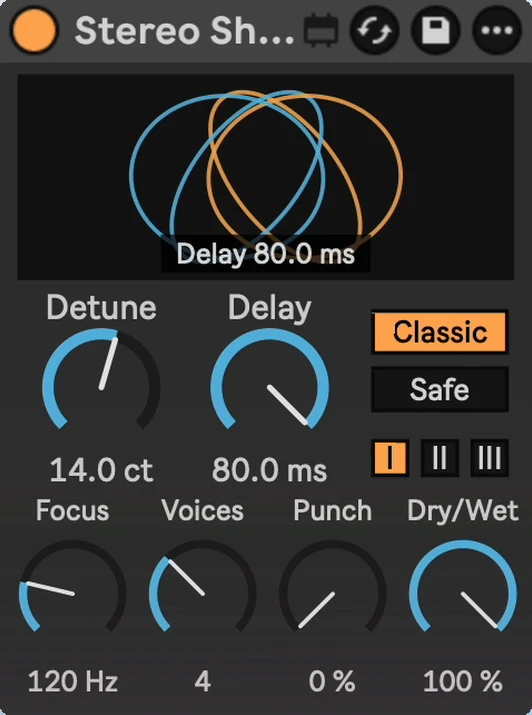
Stereo Shift
Make any sound wide and thick with a small, stock-style micro-pitch widener.
- Format
- Max for Live Audio Effect (.amxd)
- Requires
- Ableton Live 12 + Max for Live
- Made by
- ELXR
What it does
Stereo Shift adds slightly detuned, slightly delayed copies of your sound and spreads them across the stereo field: the classic micro-pitch doubling trick for synths, vocals, guitars and pads. The display shows the copies as moving shapes that open up, pull apart and turn as you play with the knobs.
Why I made it
Inspired by Soundtoys' MicroShift, which I use on almost everything. I wanted the same effect as a compact device that looks like it came with Live, plus a mode that stays safe in mono. Not affiliated with Soundtoys.
Inside Stereo Shift
Detune and Delay
Detune sets how far apart the copies are pitched. Delay sets how far behind they sit: tight doubling, or a loose second take.
Voices
From a simple doubler (2 voices) to a full ensemble (8 voices).
Focus
Keeps the low end dry and centred, so the bass stays solid.
Styles I / II / III
Smooth: warm and soft (the default). Wide: clean, with one side delayed for extra width. Bright: open and punchy.
Classic / Safe
Classic is the thick, classic doubler sound. Safe sounds exactly the same as the original when your track is played in mono.
Punch
Keeps note attacks tight and centred while the tails spread wide.
Requirements & install
- Ableton Live 12 with Max for Live.
- No added latency.
- Download Stereo Shift.amxd and drag it into your User Library, or straight onto a track.