 ELXR
ELXR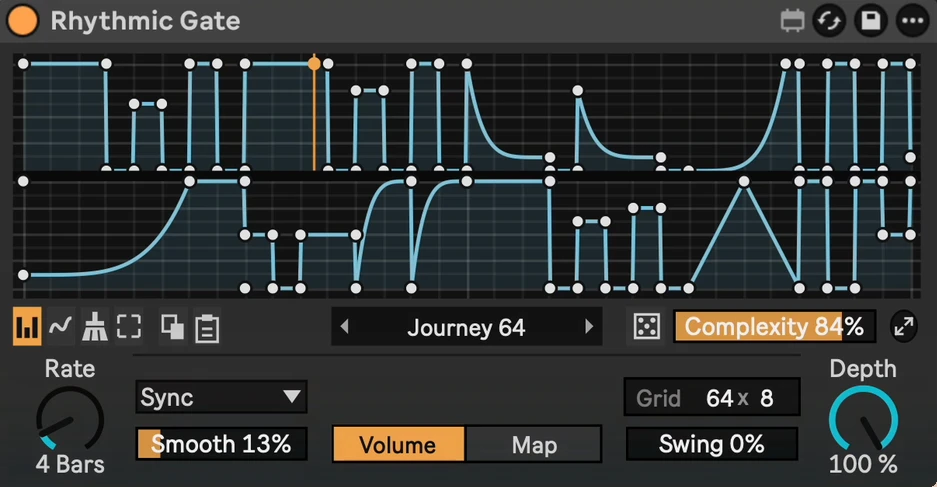
Rhythmic Gate
Trance gates, pumps and rhythmic volume shapes, synced to Live, in a stock-style device.
- Format
- Max for Live Audio Effect (.amxd)
- Requires
- Ableton Live 12 + Max for Live
- Made by
- ELXR
What it does
Pick a gate from 90+ presets, roll a random one, or draw your own. The whole pattern is on the device, up to 64 steps.
Why I made it
It started as my LFO Tool and grew into a gate. I wanted trance gates I could see, pick from a list and randomise quickly, without leaving Live.
Inside Rhythmic Gate
Presets
90+ built-in gates, pumps and shapes, starting with a classic trance gate. Save your own and sort them into folders. [GIF: 2_presets.gif]
Random gates
Roll a new gate with the dice. Complexity sets how busy it is. [GIF: 3_random_gates.gif]
Draw your shape
Paint steps with Block, draw freehand, or turn Block off and bend any curve. Select, copy and paste parts of the pattern. [GIF: 4_draw_bend.gif]
Grid up to 64 steps
Double or halve the steps and the pattern is kept. Long patterns show on two rows. [GIF: 5_grid_64.gif]
Swing and Smooth
Swing pushes every second step late. Smooth rounds off clicks and sharp edges. [GIF: 6_swing_smooth.gif]
Rates
Sync, Triplet, Dotted, 16ths or free Hz.
Volume or Map
Gate the track's volume, or map it to any knob in your set with Min and Max.
Depth and Expand
Depth sets how strong the gate is. Expand opens a big editor window.
Requirements & install
- Ableton Live 12 with Max for Live.
- Syncs to Live's tempo and transport.
- Download Rhythmic Gate.amxd and drag it into your User Library, or straight onto a track. Your presets are saved in User Library/Presets/Audio Effects/Max Audio Effect/Rhythmic Gate Presets.