 ELXR
ELXR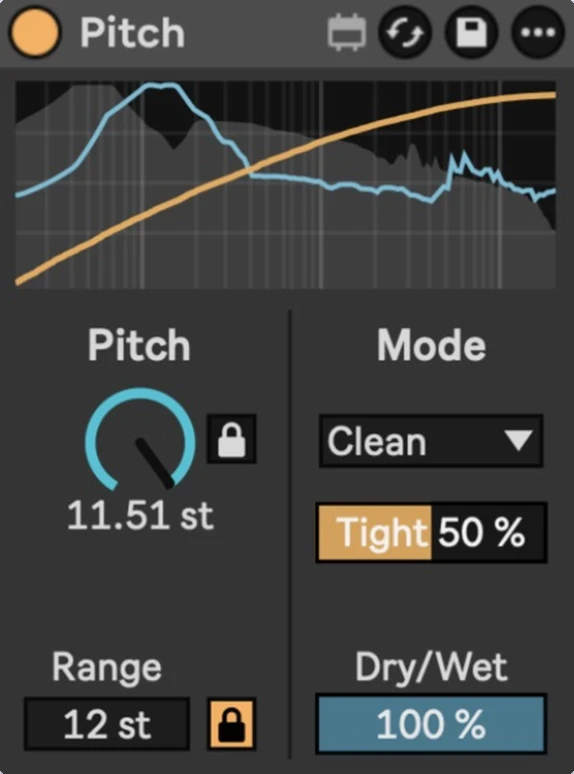
Pitch
Smooth, continuous pitch over a wide range, in a Utility-sized, stock-style device.
- Format
- Max for Live Audio Effect (.amxd)
- Requires
- Ableton Live 12 + Max for Live
- Made by
- ELXR
What it does
Pitch is a small pitch shifter made for automation. Instead of jumping from semitone to semitone, the Pitch knob moves smoothly across the whole range, so risers, drops, tape-stop style bends and vocal glides sound continuous. It's the size of Utility and uses Live's own colours and controls, so it sits in your chain like a native device.
Why I made it
Inspired by Kilohearts' Pitch Shifter. I built it because Live's Shifter steps by semitone on Coarse and has a limited Fine range, and I wanted one smooth knob for big pitch moves.
Inside Pitch
Smooth, continuous pitch
sweep from –Range to +Range without steps.
Range 1–96 semitones
Range Lock snaps it to whole octaves (12, 24, 36…); unlock for any range.
Semitone Lock
snaps the knob to whole semitones when you want musical intervals.
5 modes
Clean: waveform-aligned granular shifting, tight and punchy (Tight %). · Grain: classic granular sound with adjustable grain size (ms). · Spectral: phase-vocoder shifting for pads and sustained sounds (Smooth %). · Formant: spectral shifting that keeps a voice's character (Formant %). · Vocal: clean, natural shifting for solo vocals, with formant control (Formant %).
Spectrum display
original signal in grey, shifted signal in blue on an EQ Eight-style grid. A yellow line draws your pitch move as you make it.
Dry/Wet
for parallel pitch layers.
Requirements & install
- Ableton Live 12 with Max for Live (Live Suite, or Standard + Max for Live add-on).
- Reports its latency to Live, so it stays in time with the rest of your set.
- Download Pitch.amxd and drag it into your User Library, or straight onto a track.